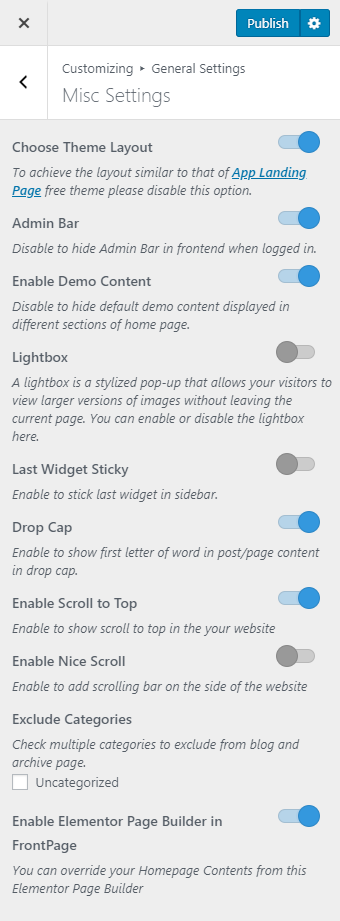
Please follow the below steps to configure Misc Settings
- Go to Appearance > General Settings > Misc Settings
- Enable/Disable Choose Theme Layout. Disable to achieve App Landing Page Free Theme Layout. (Blue is enabled)
- Enable/Disable Admin Bar. Enable to show admin bar in frontend when logged in. (Blue is enabled)
- Enable Demo Content to override the contents in your Frontpage to that of the demo. (Blue is enabled)
- Enable/Disable Lightbox. Enable to show larger versions of images without leaving the current page. (Blue is enabled)
- Enable/Disable Last Widget Sticky. Enable to stick the last widget in the sidebar. (Blue is enabled)
- Enable/Disable Drop Cap. Enable to show the first letter of the word in post/page content in drop cap. (Blue is enabled)
- Enable/Disable Scroll to Top. Enable to show scroll to top in your website. (Blue is enabled)
- Enable/Disable Nice Scroll. Enable to add scrolling bar on the side of the website. (Blue is enabled)
- Check Exclude Categories to exclude categories from blog and archive page. (Blue is enabled)
- Enable/Disable Elementor Page Builder in FrontPage. (Blue is enabled)
- Click on Publish when done.