Documentation

Menu
  • Home
  • Documentation

Kalon Documentation

Getting Started

  • Introduction
  • WordPress Requirements and Checklists

Theme Installation & Activation

  • How to Install & Activate Kalon WordPress Theme?
  • Recommended Plugins
  • What are the Recommended Image Sizes?
  • How to Import Demo Content?

Configure Header & Footer Section

  • How to configure Site Logo/ Name & Tagline to your website?
  • How to Create & Edit Navigation Menu?
  • How to Add Footer Widgets?

Appearance Settings

  • How to Change Website Colors?
  • How to Change Background Image?
  • How to configure social Media on your website?
  • How to Configure Slider Settings?

Homepage Settings

  • How to Set up the Front/Landing/Home Page and Blog Page?

SEO and Performance Settings

  • How to Add Google Analytics to your website?

FAQs

  • How to Configure Footer Settings?
  • How to add Additional CSS Codes?
  • How to change the Logo Size of your website?
  • Why is the Customizer not showing up?
  • How to Update Theme & Plugins?
HomeKalon Documentation FAQs How to add Additional CSS Codes?

How to add Additional CSS Codes?

Last updated July 23, 2019July 23, 2019

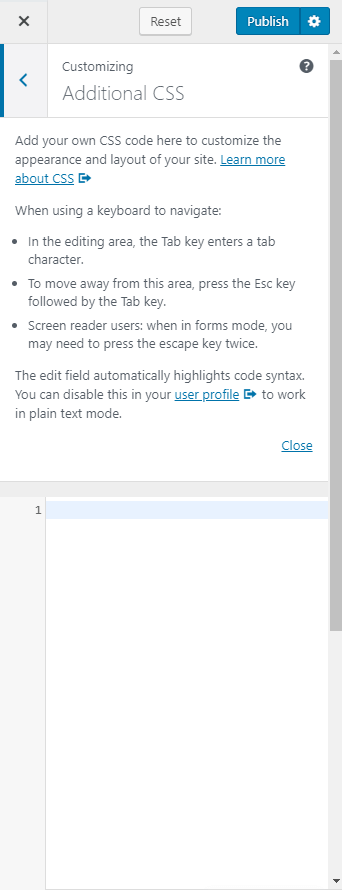
You can add extra CSS codes here. If you want to modify the color, fonts, or any other CSS effects, you can enter the code here.

  • Go to Appearance> Additional CSS
  • Enter your code
  • Click on Publish

Add additional css codes rara theme

Doc navigation

← How to Configure Footer Settings?How to change the Logo Size of your website? →
Still stuck? How can we help?
Was this article helpful for you?
Documentation. Copyright © 2015 - 2026 All Rights Reserved. Made with in Nepal.