Documentation

Menu
  • Home
  • Documentation

Feminine Pink Documentation

Getting Started

  • Introduction
  • WordPress Requirements and Checklists

Theme Installation and Activation

  • How to Install & Activate Feminine Pink WordPress Theme?
  • Recommended Plugins
  • What are the Recommended Image Sizes?
  • How to Import Demo Content?

Configure Header and Footer Section

  • How to configure Site Logo/ Name & Tagline to your website?
  • How to Create & Edit Navigation Menu?
  • How to Add Widgets?
  • How to Add Social Media in the Header Section?

Appearance Settings

  • How to Change Website Colors?
  • How to Change Website Background?
  • How to configure social Media on your website?

Homepage Settings

  • How to Set up the Front/Landing/Home Page and Blog Page?
  • How to Configure Slider Settings?

General Settings

  • How to Configure Pagination Settings?
  • How to Configure Social Settings?

SEO and Performance Settings

  • How to Add Google Analytics to your website?

FAQs

  • How to Configure Footer Settings?
  • How to add Additional CSS Codes?
  • How to change the Logo Size of your website?
  • Why is the Customizer not showing up?
  • How to Update Theme & Plugins?
HomeFeminine Pink Documentation General Settings How to Configure Pagination Settings?

How to Configure Pagination Settings?

Last updated July 22, 2019July 22, 2019

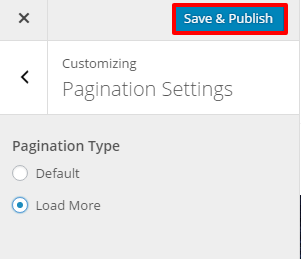
Please follow the given steps to configure pagination settings:

  • Go to Appearance >Customize>Pagination Settings
  • Select Default or Load More
  • Click Save & Publish.

pagination settings

Doc navigation

How to Configure Social Settings? →
Still stuck? How can we help?
Was this article helpful for you?
Documentation. Copyright © 2015 - 2026 All Rights Reserved. Made with in Nepal.