Documentation
Menu
Home
Documentation
Feminine Fashion
Search for:
Home
Feminine Fashion
Configure Header and Footer Section
How to Configure Copyright Settings?
How to Configure Copyright Settings?
Last updated
June 7, 2021
June 7, 2021
Go to
Admin Dashboard >
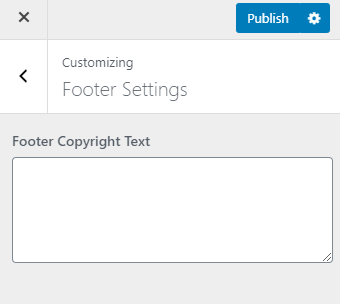
Appearance > Customize > Footer Settings.
Enter the copyright text in the
Footer Copyright Text
field
Click on
Publish
.
Doc navigation
← How to Add Social Links in the Header?
How to Enable Header Search? →
Still stuck?
How can we help?
Was this article helpful for you?